Sobeys Former Employee T4: How to Get Your Tax Slip
Get your T4 and pay slips from the Sobeys former-employee service, and know your backup options once that access ends.
Quick answer
Go to peopleportal.sobeys.com, select Continue, and register or log in to the former-employee tax and pay slip service. Open Tax Slips, choose the tax year, and download your T4 (or RL-1 in Quebec). Access normally lasts until April 30 of the year after you leave. After that, you can usually see the same T4 in your CRA My Account.
Before you start
What you need to access your T4 as a former employee
The former-employee service is separate from the login you used while working. It does not use your old password. You register again with a personal email.
| Item | Why you need it |
|---|---|
| Former Employee Number | Your old Employee ID. Look for it on an old pay statement. |
| Social Insurance Number (SIN) | All nine digits. Used to confirm your identity. |
| Date of birth | Entered as a four-digit year and two-digit month and day. |
| Personal email | You’ll get a confirmation link here, so use one you can open now. |
| A new password | Created during registration. Follow the rules shown on screen. |
Step by step
How to download your Sobeys T4 after leaving
These steps follow Sobeys’ own T4 and pay slip user guide for former employees. The screenshots come from that guide.
Part 1: Open the former-employee service
- Open the official portalType peopleportal.sobeys.com into your browser. Don’t enter your SIN on any other site, including this one.
- Select ContinueLeave the Employee ID and Password boxes empty. Below the login box, the line for former employees has a green Continue button.
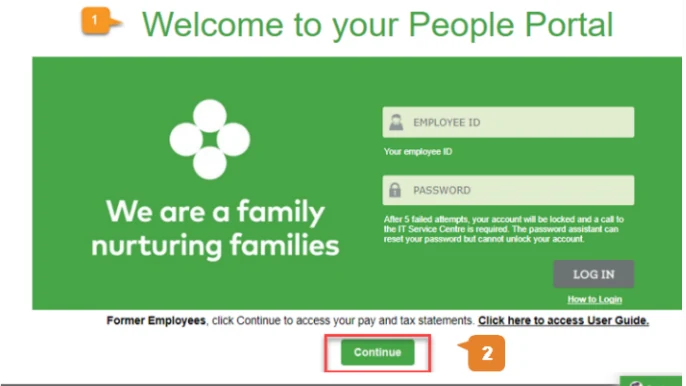
Part 2: Register (first time only)
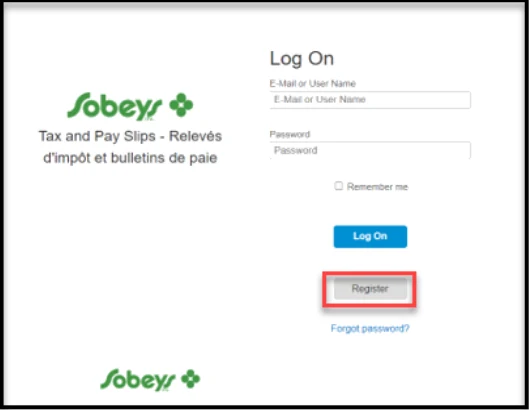
- Select RegisterThe Tax and Pay Slips Log On page opens. First-time users select Register.
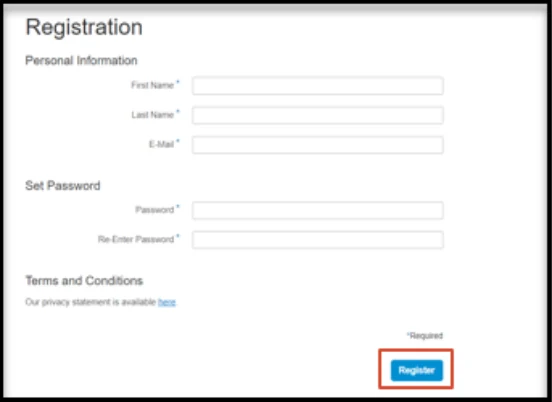
- Fill in the Registration formEnter your First Name, Last Name and a personal E-Mail. Create a password, type it again under Re-Enter Password, tick the privacy statement box and select Register.
- Confirm your emailYou’ll get a confirmation email. Open it and click the link to finish registering. Check your spam folder if it doesn’t show up.
Part 3: Verify your identity
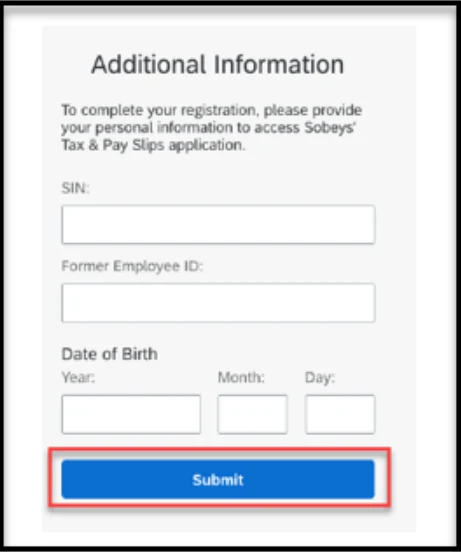
- Fill in Additional InformationEnter your nine-digit SIN and your Former Employee ID. This is the same Employee ID you used to log in to the People Portal while you worked at Sobeys.
- Enter your date of birth and submitThere are three boxes: Year (4 digits), Month (2 digits, 01 to 12) and Day (2 digits, 01 to 31). For example, June 27, 1968 goes in as 1968, 06, 27. Then select Submit.
Part 4: Download your T4 or pay slip
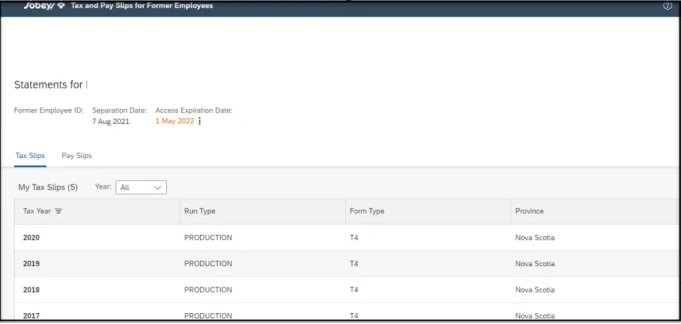
- Check the top of the main pageIt shows your Former Employee ID, Separation Date and Access Expiration Date. Note the expiration date.
- Open Tax SlipsThe Tax Slips tab lists each slip by Tax Year, Form Type (T4, or Rel1 for Quebec) and Province. Use the Year filter, then click the slip you need.
- Download or printThe slip opens in a viewer with Download and Print buttons at the top. For pay statements, open the Pay Slips tab and pick a Payment Date.
Forgot your former-employee password?
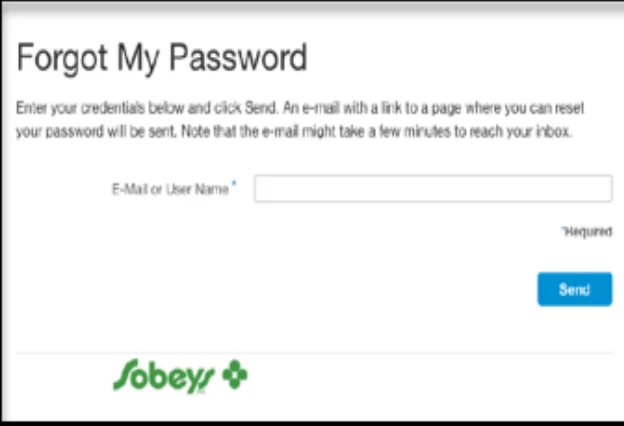
On the Log On page, select Forgot password?. Enter the email you registered with and select Send. Open the email and click the Password Reset button or link. The email can take a few minutes to arrive.
Access deadline
How long former employees can use the service
The Sobeys former-employee guide says access lasts for the rest of the year you leave and until April 30 of the following year.
| If you left in | Access normally ends | T4 you’ll need |
|---|---|---|
| Any month of 2026 | April 30, 2027 | 2026 T4 (out by end of February 2027) |
| Any month of 2025 | April 30, 2026 | 2025 T4 |
Your exact date is shown as Access Expiration Date at the top of the main page. In the Sobeys guide’s example, someone who left on August 7, 2021 had access until May 1, 2022.
Your T4 for the year you left appears before access ends, so you have about two months to download it. Save it as soon as it shows up. A password reset won’t bring back access once it has expired.
The date shown in your own account is the one that counts. Sobeys can change these rules.
Backup option
Lost access? Get your T4 from the CRA instead
Sobeys files a copy of every T4 with the Canada Revenue Agency. That means you can usually see your slip in CRA My Account even after the Sobeys service closes.
- Sign in to CRA My AccountGo to canada.ca and search “CRA My Account”. Sign in or register using your bank sign-in or a CRA user ID.
- Open Tax slipsLook under the tax return or slips section and choose the year.
- Find the Sobeys T4Check that the employer name, tax year and income look right, then print or save it.
Quebec employees: your RL-1 slip
If you worked in Quebec, you also get an RL-1 for your provincial return. Download it from the Sobeys service while you still have access. If you missed it, check your Revenu Québec My Account or call the Sobeys HR Service Centre.
If the T4 isn’t in either place
Call the HR Service Centre and ask for a copy. Don’t wait until the tax deadline. If the slip is wrong, Sobeys has to issue the correction. The CRA can’t change your employer’s slip.
Related document
Your Record of Employment (ROE)
A T4 is for taxes. An ROE is for Employment Insurance (EI). You’ll need it if you apply for EI after leaving Sobeys.
- Employers using electronic ROEs and weekly, biweekly or semi-monthly pay must file within five calendar days after the end of the pay period in which your job ended.
- You don’t get it from the People Portal. View and print it in My Service Canada Account.
- If your ROE doesn’t show up, call the HR Service Centre first, then Service Canada.
Troubleshooting
Common problems and fixes
| Problem | What to do |
|---|---|
| Identity check fails | Stop before the fifth attempt. Check your Employee Number against an old pay stub. If you are already blocked, register again with a different personal email or call the HR Service Centre. |
| Don’t know your Employee Number | Look at an old pay statement, offer letter or ROE. If you can’t find it, call HR. |
| Confirmation email never arrives | Check spam. Make sure you typed the email correctly. Wait a few minutes before you register again. |
| T4 not listed yet | The slip may not be posted until February. Check again after mid-February. |
| Access expired | Use CRA My Account, or call HR for a copy. |
| Amount looks wrong | Compare it with your last pay stub’s year-to-date totals, then contact HR or payroll. |
Get help
Who to call
HR Service Centre
1-800-295-3348
Missing or wrong T4, Employee Number, expired access, ROE questions.
Solution Centre
1-877-425-1845
Technical problems: pages not loading, login errors.
Never share your SIN or password with anyone who calls or messages you first. Also, this site can’t look up or recover your account. For the regular employee login, paystubs and other portal tasks, see our Sobeys People Portal login guide.
Short answers
Questions former employees ask
Can I use my old employee password?
No. The former-employee service needs a new registration with your personal email.
Does this work for Safeway, FreshCo or Foodland employees?
It depends on your employer. Some banner and franchise stores use their own payroll. If the Sobeys service doesn’t recognize you, ask your former store or employer.
Can I get T4s from older years?
The Sobeys service shows the slips available while you have access. For older years, use CRA My Account, which keeps slips from past years.
Do I need the paper T4 to file my taxes?
No. Most tax software can pull your slip from the CRA. Still, keep a copy and check it against your own records.
Last checked October 20, 2026. This is an independent guide. It is not affiliated with Sobeys Inc., Empire Company Limited or SAP. Steps, deadlines and screenshots come from Sobeys’ T4 and pay slip user guide for former employees. Tax and ROE details come from the Canada Revenue Agency and Service Canada. Portal screens and rules can change, so the official service always has the final word.